
Your CPU Is Lying to You About Speed: It Has Been for 40 Years
The memory wall, and everything modern hardware does to pretend it doesn't exist.

What if I told you that your processor, the thing capable of doing billions of operations per seconds, spends most of it’s time just… doing nothing? Not because it ran out of things to do, but rather waiting hundreds of cycles just for the data to show up. This has been the case for quite some time and has resulted in the rise of a lot of the Modern Computer Architecture concepts like caches, prefetchers and even the multi-core CPUs instead of a single-core CPU with a 20GHz clock speed!
Don’t believe me? Here’s proof.
// memory access — 14ms
#pragma omp parallel for reduction(+:sum)
for (int i = 0; i < N; i++) {
    sum += udata[i];
}
// direct computation — 3.5ms
#pragma omp parallel for reduction(+:sum)
for (int i = 0; i < N; i++) {
    sum += (float)i;
}
Same CPU. Same loop. Same number of iterations. One reads from memory, one just computes. 4X slower. Not because the CPU got tired, it was barely working. It was just sitting there, drumming it’s fingers, waiting for the data to show up.
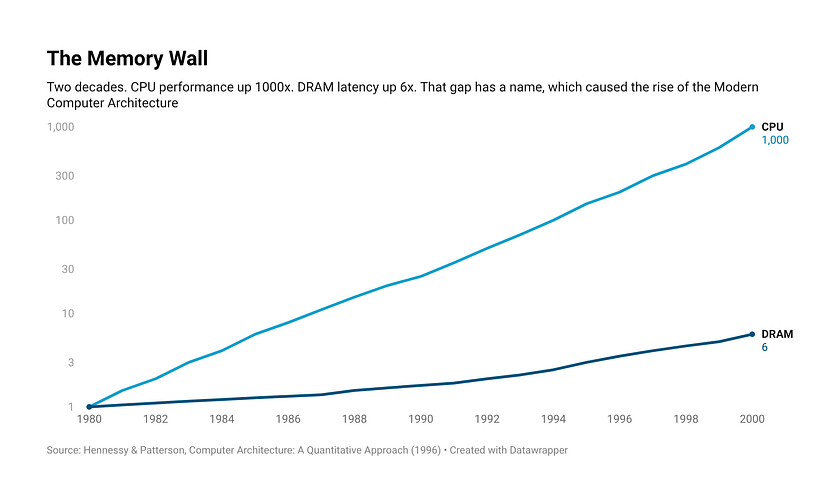
That wait has a name. It’s been wrecking performance for forty years, and most people have no idea it exists. The Memory Wall.
The Drift
Alright then, back in the 1970s, computers were still finding their feet. CPU and Memory were both primitive, both slow, and crucially both improving at roughly the same pace. Nobody was worried about a gap. There wasn’t one yet.
Around the same time, what started as a casual observation about transistor counts quietly became one of the most consequential predictions in tech history. First coined in 1965 by Gordon Moore, the Intel Co-Founder, the law states the number of transistors on a microchip doubles roughly every two years while the cost of producing them cuts in half. This leads to higher computation power overall.
Initially a short-term prediction, it held roughly true for five decades, driving the rise of new tech and industries without which the modern world would be quite unimaginable.
Back to now, a well documented trend shows that initially the CPU speeds and Memory speeds kept rising proportionately, but by the 90s the drift started becoming a little prominent. The CPU clock speeds skyrocketed to 100MHz and beyond. What this meant was that the CPU consumed a word of memory every 10-nanoseconds in a single clock tick. This, even by today’s standards is very steep compared to the Memory Speeds, which run at around 600MHz, roughly a 12-nanosecond single clock tick, even now.
During the early and middle 2000s, the battle to the fastest CPU continued between AMD and Intel. The speeds reached a massive 4GHz range which resulted in the mismatch with the Memory speeds back then, and even today per se. If you’ve ever noticed, the CPU Clock Speed is stabilized at around the 3–4GHz range, even 20-years after achieving that very exact clock speed, which is not usually the case in tech.
Fix the RAM
The obvious question is, why not just make the RAM faster. That should solve all the problems, just keep up with the CPU speeds is all that solves the problem. It sounds simple, but it’s not that straightforward.
Why, you might ask? Well it’s right in the name. DRAM or Dynamic RAM. As the name suggests, it means that every bit is stored as a charge in a tiny capacitor and controlled using a transistor. And as you might know, capacitors inherently leak charge. So the DRAM has to constantly refresh every cell, thousands of times per second. This refresh cycle itself introduces latency. Now you might ask then why use Capacitors at all if they have a drawback? Why not look for an alternative which solves this? After all, that’s how Engineers spend their lives doing, optimizing, finding alternatives and solving problems the better way.
Anyways. Yes, there is a better solution to this after all. Meet the SRAM or Static RAM. No capacitors, no refreshing required thousands of times every second. A simple, lovely flip-flop, a 6-transistor based circuit. It reads fast, writes fast, and holds it’s state without needing a constant refresh.
Now that it’s out there that SRAM is faster than DRAM and also takes less power to operate and both of the technologies are around three-decades old each, you might be surprised to know that the main memory we still use is majorly DRAM and it all comes down to the size, cost and scalability. This is one of the main factors affecting a technology from going public to the masses, because unlike the military, not everyone can afford memory more expensive than the CPU itself.
Memory Hierarchy
Back in the mid-2000s, vendors realized they couldn’t keep up with raising the frequency forever. This forced the vendors and programmers to look into new directions for fully utilizing the machine’s power. One of which was, introducing theMemory Hierarchy Model.
So we know that the DRAM is cheap and scalable but not so fast and the SRAM is fast but expensive and difficult to scale, so the engineers came up with a hybrid solution, as they always do. This led to the introduction of Cache, which turned out to be a revolutionary idea. This fundamentally changed how the Computer Architects thought about the problem. Instead of making the memory faster, we make the CPU wait less often. This further led to various workarounds for the Memory Wall problem.

So the idea is simple, keep a small amount of high-speed SRAM next to the CPU. There doesn’t have to be gigabytes of it like the traditional memory, just a few kilobytes does the job. The data that is required next is likely to be in the Cache. If the CPU finds what it needs there, that’s a Cache-Hit, and takes maybe 1–4 nanoseconds to retrieve the data. This is very fast as compared to the 70 nanoseconds by the DRAM, which needs to be accessed in case of a Cache-Miss.
Now there is a limit to size of SRAM that can be put up next to CPU without burning a hole in the user’s wallet. Engineers built the Cache in layers.
L1 Cache : Tiny but fast SRAM, roughly 32–64 kilobytes
L2 Cache : Slightly bigger and slower, yet still on die
L3 Cache : Usually shared across cores, it spans several megabytes. Slower than L1 yet miles ahead of DRAM.
Now you might wonder that a Cache-Miss will be huge loss of the precious CPU clock-cycles since it required fetching data from the DRAM itself over multiple Cache-layers. This would indeed be true if the Cache would fetch the memory byte-by-byte, which is not the case. Every time the CPU needs a piece of data, it doesn’t ask “Is this in cache or RAM?”, it simply makes a memory request for an address which is handled by the Cache-Controller. For a Cache-Hit, it simply returns the data almost immediately. But for Cache-Miss, the Cache-Controller goes to the DRAM and fetches the entire Cache-Line, which roughly translates to around 64-bytes of contiguous memory. The memory hierarchy then takes action.
The further you keep going, the latency keeps increasing and by the time you reach the DRAM, you’re in a completely different time-zone compared to the CPU.
And this still works because of a surprisingly convenient truth about how programs behave. Remember the two loops from earlier, the one reading from udata[] and the one just computing (float)i? Look at the first one. You access udata[0], then udata[1], then udata[2], sequential addresses, one after another. The cache controller sees you grab udata[0] and immediately pulls in the entire 64-byte cache line around it — so udata[1], udata[2], udata[3] are already sitting warm in cache before you even asked for them. You needed data at address X, and the neighborhood came along for free. That's Spatial Locality, programs tend to access memory in patterns, not random jumps.
Now think about that loop counter i that gets read and written on every single iteration, thousands of times. Once it lands in cache it just stays there, getting hit over and over without ever touching DRAM again. That's Temporal Locality, data you touched recently is almost certainly going to be touched again soon.
These two patterns are the reason cache isn’t just a good idea on paper, they’re why it actually works in practice. The cache controller pulling an entire 64-byte line isn’t being greedy, it’s making a bet that Spatial Locality holds. And it almost always does. Same with keeping recently accessed data warm. Temporal Locality means that bet pays off too. Together they push cache hit rates to 95–99% on well optimized code.
That remaining 1–5% miss rate though? Still painful enough to keep architects up at night.
The Workarounds
Cache was brilliant, but it wasn’t enough. The gap was too wide for one solution to paper over. So naturally, engineers did what engineers always do, they kept building on top of it.
Multicore-Age
By the mid-2000s, pushing clock speeds higher had hit a hard ceiling. More frequency meant more voltage, more voltage meant more heat, and more heat meant chips that would quite literally burn themselves out. Intel famously cancelled Tejas, the Pentium 4 Prescott's successor, in 2004 — early silicon was already hitting 150W at just 2.8GHz. Enough heat to fry and egg on. Not great for a consumer product.
So vendors did the next logical thing, instead of making one core faster, they put multiple cores on the same die. Same power envelope, more compute. The multicore age had begun.
Here’s the irony though. More cores meant more compute hungry units all sharing the same memory bus. Where before you had one core waiting on DRAM, now you had four! Then eight. All of them fighting over the same pipe, all of them starving. The memory wall didn’t just stay, it got wider.
Prefetchers
But even with multiple cores working in parallel, each one still had the same fundamental problem, Cache was reactive. It could only help after the CPU had already asked for the data. So engineers went one step further. What if the cache controller could predict what you’d need next and start fetching it before you even asked?
That sounds rather crazy but that’s exactly what Prefetchers do. The hardware prefetcher sits inside the CPU, watches your memory access patterns in real time, and starts pulling data into cache ahead of time. Accessing an array sequentially? It’s already fetching the next few elements before you get there. On the software side, compilers can insert explicit prefetch instructions into your code, essentially a heads up to the CPU that certain data is coming up soon.
Prefetchers work beautifully for predictable access patterns. But the moment things get irregular though, pointer chasing, linked lists, tree traversals, the prefetcher goes blind. No pattern to predict from, no early fetch, back to waiting.
Prefetchers honestly deserve their own deep dive, so maybe next time…
Out Of Order Execution
Prefetchers made the CPU smarter about when to fetch. But pointer chasing, irregular jumps, unpredictable patterns — a Cache-Miss was still a Cache-Miss, and those 200–300 wasted cycles weren’t going anywhere.
So the architects tried something different. Instead of stalling the pipeline waiting for data, why not compute something else in the meantime? That’s Out of Order Execution , the CPU looks ahead in the instruction queue, finds instructions that don’t depend on the missing data, and executes those first. Essentially: “you’re slow, I’ll come back to you.”
The hardware complexity is significant, tracking dependencies, maintaining the illusion of sequential execution, reconciling everything before committing results. But it works. Modern CPUs have Out-Of-Order windows hundreds of instructions deep.
Still not a fix. Just a very clever way of not standing still while you wait.
Compression and Data Access
Another fix nobody sees coming. Every workaround so far had attacked the same problem: reduce the time it takes for data to arrive. That’s a Latency-first mindset. But what if the real bottleneck is Bandwidth, the amount of data you can push through the bus per second? In simple words, the bottleneck is the bus, not the compute. We can still compute at tremendous speeds if we manage to keep the data flowing fast enough.
What if the data is shrunk and passed through the bus? It might sound counterintuitive but the math works out for highly compressible datasets. This is the case because the Decompression-Cost is much cheaper than the Transfer-Cost.
PIM
Now, every single workaround that we have seen throughout follows the same premise. There exists a processor and there exists a memory, and we try covering up this gap as fast as possible. Forty years of bringing the CPU and Memory closer via faster and faster methods is built on this premise. What if the premise is wrong?
That’s what Processing-In-Memory is all about. Instead of moving the data to the processor, why not process directly inside the memory, or just next to it. No bus, no latency, no wall. Processor and data, all in the same place.
And this is closer to reality than you might imagine. PIM might not be directly available or accessible for the general purpose applications yet, but it’s research is accelerating heavily. And finally, the industry is no longer thinking about patching the gap. It’s questioning whether the gap needs to exist at all!
That’s another deep-dive blog to explore and write about!
Conclusion
The Memory Wall isn’t a bug. It’s not a mistake some engineer made in the 70s that nobody bothered fixing. It’s a fundamental physical constraint, moving data costs time and energy, and no amount of clever engineering fully escapes that reality.
What’s remarkable isn’t that the wall exists. It’s everything built around it. Caches, prefetchers, out-of-order execution, multicore, compression, each one a brilliant hack layered on top of the last, each one buying a few more years before the wall caught up again. Forty years of computer architecture is essentially forty years of very smart people refusing to accept a hard limit.
And yet here we are. The hacks are getting harder. The gains are getting smaller. The wall isn’t going anywhere.
Which is exactly why PIM is exciting. Not because it’s a guaranteed solution, but because it’s the first idea in forty years that doesn’t try to cross the wall faster, it questions whether the wall needs to exist at all. That’s a different kind of thinking. And in a field that spent four decades building taller ladders, someone finally asked if we’re climbing the right building.
Whether PIM delivers or not, the memory wall story isn’t over. It’s just entering a new chapter. And honestly? That’s the most interesting place for it to be…
